Meet Nilgiri Tea House
Nilgiri Tea House is the example merchant we run in production so that you can see OACP working end to end. It sells loose-leaf teas, a gift sampler and a few tea accessories from a (made-up) store in Ooty, in the Nilgiri hills.
Nilgiri Tea House, from shop to sale
The shop's catalog and limits go into AgenticOrg. Grantex signs those facts. The shop proves its own address with a DNS record. Buyer agents find it and search it, and the arbiter decides every checkout.
Here is what is switched on for it today.
| What | Status | Where |
|---|---|---|
| Shop profile for buyer agents (UCP) | Live | https://nilgiritea.agenticorg.ai/.well-known/ucp |
| Catalog search and lookup | Live, no key needed | https://nilgiritea.agenticorg.ai/ucp/catalog/search |
| Facts signed by Grantex | 11 signed artifacts, all verified | Refreshed automatically when they expire |
| Checkout, cart and order (UCP), ACP feed and checkout | On | Needs a platform API key issued by the merchant |
| Shopping from ChatGPT and other MCP apps | Live, no sign-in, no payment tools | https://mcp.agenticorg.ai/mcp (how to connect) |
| Payments | Off: no payment method chosen, and agent-executed payment is off | No money can move in this demo |
Try it yourself in two minutes
You need no account. Any computer with curl, or just a web browser for the first step, will do.
- 1Open the shop's profile
Visit https://nilgiritea.agenticorg.ai/.well-known/ucp in your browser. This is the file every buyer agent reads first. It names the UCP version, where to send requests and what the shop can do.
- 2Search the catalog
Send the search below with the word chai. The shop answers with its Masala Chai Blend, its price in paise and whether it is in stock.
- 3Search for something else
Try green, kettle or an empty query for all 10 products. One tea, the Blue Mountain Oolong, is sold out on purpose, so you can see how stock is shown.
The profile, shortened:
curl -s https://nilgiritea.agenticorg.ai/.well-known/ucp
{
  "ucp": {
    "version": "2026-04-08",
    "services": {
      "dev.ucp.shopping": [
        { "transport": "rest", "endpoint": "https://nilgiritea.agenticorg.ai/ucp" }
      ]
    },
    "capabilities": {
      "dev.ucp.shopping.catalog.search": [ ... ],
      "dev.ucp.shopping.checkout": [ ... ],
      "dev.ucp.shopping.ap2_mandate": [ ... ]
    }
  },
  "signing_keys": [ { "kty": "EC", "crv": "P-256", ... } ]
}
The search:
curl -s -X POST https://nilgiritea.agenticorg.ai/ucp/catalog/search \
  -H 'Content-Type: application/json' \
  -d '{"query":"chai","context":{"currency":"INR"}}'
{
  "products": [
    {
      "title": "Masala Chai Blend",
      "description": { "plain": "Synthetic demo product. Black tea with cardamom, ginger, clove and cinnamon." },
      "variants": [
        {
          "sku": "NTH-MASALA-250",
          "title": "250 g",
          "price": { "amount": 44900, "currency": "INR" },
          "availability": { "available": true, "status": "in_stock" }
        }
      ]
    }
  ],
  "pagination": { "has_next_page": false, "total_count": 1 }
}
Prices are in the smallest unit of the currency, so 44900 means ₹449.00. The whole shelf looks like this:
What a buyer agent sees
The 10 products the shop serves, with prices and stock. Every answer comes from facts that Grantex signed and AgenticOrg verified. If those facts expire and cannot be renewed, the shop stops answering instead of guessing.
Part 1. How the shop was set up
These are the steps behind Nilgiri Tea House, in order. For the demo, a setup script runs them in one go, calling the same AgenticOrg functions the dashboard uses. For your shop, the Sell Everywhere page (/dashboard/sell-everywhere) takes you through the same steps and runs the Grantex and publishing steps itself; see Sell everywhere. The detail of each step is in the Merchant setup checklist.
- Create the merchantOwner: Merchant
The shop got its own tenant, an administrator and a merchant record: merchant ID nilgiri_tea_house and seller agent seller_agent_nilgiri_tea. For you: sign up, then type a shop name on Sell Everywhere and select Create shop; the id is generated.
Blocked / exceptionYou need the administrator or merchant role.
- Load the catalogOwner: Merchant
Its 10 products, prices and stock went in, plus one store with opening hours. A real shop connects Shopify read-only, or uploads a CSV or JSON file, on Sell Everywhere.
Blocked / exceptionA missing Shopify credential, a wrong store domain or a bad file row stops the read and says why.
- Set purchase limitsOwner: Merchant
The largest order, the allowed currency (INR) and the most items per order. For you: the Order limits step on Sell Everywhere, which also asks for your daily maximum.
Blocked / exceptionWithout limits, Sell everywhere stays off for your shop.
- Get the facts signedOwner: Platform operator for the demo; AgenticOrg for you
The operator added the shop to the Grantex allowlist. AgenticOrg then asked Grantex to sign the catalog, prices, stock, policies and capabilities, and got 11 signed artifacts back. For you: turning on Sell everywhere enrols you with Grantex and asks for the signatures, with no allowlist edit for your shop.
Blocked / exceptionThe Grantex enrolment row says Waiting while your deployment's Grantex cannot enrol tenants yet.
- Check every signatureOwner: AgenticOrg
AgenticOrg checked each artifact's signature, key, expiry and revocation status before keeping it. All 11 passed.
Blocked / exceptionA refusal names the reason, for example revocation_status_unavailable; nothing from that batch is kept.
- Create the signing keyOwner: Merchant
One signing key for the shop. Its public half is published in the profile, so agents can check the shop's own answers. For you: Sell everywhere creates it if it is missing.
Blocked / exceptionPublishing is refused with signing_key_missing until the key exists.
Part 2. Its own address
Buyer agents need a web address to find a shop. Nilgiri Tea House uses nilgiritea.agenticorg.ai, connected by hand with the two records below, the way you would connect a domain of your own. Your shop can get <your-shop>.agenticorg.ai from Sell everywhere with no DNS work (while fewer than 20 shops have one), or use a subdomain you own, such as agent.your-store.example.
Nilgiri Tea House's two DNS records
A CNAME routes the address to AgenticOrg. A TXT record with a one-time code proves the shop controls the address. With both in place, the address was attested and the profile went live.
- Ask for the challengeOwner: Merchant
AgenticOrg issued a one-time code for nilgiritea.agenticorg.ai and showed the TXT record to create. On Custom Domains you see the same thing, with copy buttons.
Blocked / exceptionAn IP address or a one-word host is not accepted.
- Add the two DNS recordsOwner: Merchant
A CNAME from nilgiritea to ghs.googlehosted.com, and the TXT record _agenticorg-ucp.nilgiritea with the code. Your own domain also needs one Search Console owner; see the custom domain guide.
Blocked / exceptionDNS changes can take up to an hour to show; check again later.
- Verify and publishOwner: AgenticOrg and Grantex
AgenticOrg looked the TXT record up, matched the code and linked the address to the shop. The shop opted in to public discovery, Grantex allowed it, and the profile went live.
Blocked / exceptionThe page lists each failed check with its fix, for example serving_host_not_attested.
- CertificateOwner: Google
Google issued the HTTPS certificate for the address. That usually takes 15 minutes and at most 24 hours.
Blocked / exceptionAfter 48 hours without a certificate, check CAA records and that the CNAME is DNS only.
Full instructions for your own domain, including every check and its fix, are in Your own domain for buyer agents.
Part 3. A buyer agent shops
This is what happens when an AI shopping agent buys tea for someone.
A buyer agent shops at Nilgiri Tea House
The agent reads the profile, searches, and opens a checkout with its API key. The mandate step belongs to agent-executed payment, which is switched off. The arbiter allows or refuses and records the decision. This demo has no payment method, so it stops before payment.
- DiscoverOwner: Buyer agent
The agent reads /.well-known/ucp and learns the address of the shop's API and which UCP features it supports.
Blocked / exceptionA 404 means the profile is not published, or its signed facts have lapsed and could not be renewed.
- SearchOwner: Buyer agent
The agent searches for chai and gets the Masala Chai Blend at ₹449, in stock. The answer comes only from verified facts.
Blocked / exceptionA catalog_unavailable message means the verified facts lapsed and could not be renewed; nothing is guessed. Try again shortly.
- Open a checkoutOwner: Buyer agent
The agent creates a checkout for NTH-MASALA-250, quantity 1, using the API key the merchant issued to its platform. The shop prices it from the same verified facts.
Blocked / exceptionWithout a valid key the shop answers 401.
- Mandates, switched offOwner: Grantex
On the agent-executed path, Grantex would issue three signed mandates: what the buyer allowed (Intent), this exact cart (Cart) and the amount and payment rail (Payment). That path is off, so no mandate is issued here.
Blocked / exceptionA mandate is refused when it goes beyond what the buyer allowed.
- DecideOwner: AgenticOrg arbiter
For a shop with a payment method, the arbiter checks its signed facts and its limits before any payment link exists, and answers allow or refuse. The decision is sealed in the ledger.
Blocked / exceptionA refusal names the first rule that failed; no link is issued and nothing is charged.
- PayOwner: The shop's payment page
Nilgiri Tea House has no payment method, so there is no payment step: once pickup is chosen the checkout is ready, and completing it answers payment_failed, "A payment instrument is required to complete." Nothing is charged. A shop that chose where buyers pay answers requires_escalation with continue_url instead: the link to its own Shopify checkout or Plural page, where the buyer pays.
Blocked / exceptionWithout a payment method, buyers get no payment link.
For an agent platform, the checkout request looks like this. The key and the platform profile are your own.
curl -s -X POST https://nilgiritea.agenticorg.ai/ucp/checkout-sessions \
  -H "X-API-Key: $PLATFORM_KEY" \
  -H "Idempotency-Key: $(uuidgen)" \
  -H 'UCP-Agent: profile="https://your-agent-platform.example/.well-known/ucp"' \
  -H 'Content-Type: application/json' \
  -d '{"line_items":[{"item":{"id":"NTH-MASALA-250"},"quantity":1}]}'
How a payment link is issued, and how the switched-off mandate path works, is in A purchase, step by step.
See it with real agents
These are real runs against the live shop on 22 and 25 October 2026, not mock-ups. Each one searches the catalog, opens a checkout and stops at the payment step. Nothing was charged.
ChatGPT, through the hosted AgenticOrg MCP server
ChatGPT connects straight to AgenticOrg's hosted MCP server at https://mcp.agenticorg.ai/mcp. The
server needs no sign-in and offers shop tools only: search, product lookup, and opening or updating a
checkout. It has no tool that pays, and each caller is rate-limited.
For these runs the server served Nilgiri Tea House alone. For Sell everywhere the same address serves
every shop on the AgenticOrg network and adds two tools: list_shops, and complete_checkout, which
returns the shop's payment link for a ready checkout. It still has no tool that pays. See
Sell everywhere.
Connect it once:
- 1Add the server
In ChatGPT on the web, open Plugins, choose Add, then Add custom MCP server.
- 2Fill in three fields
Name it Nilgiri Tea House, set Server URL to https://mcp.agenticorg.ai/mcp and set Authentication to No authentication.
- 3Create it
Tick that you trust the server, then choose Create as a plugin.
- 4Shop
In any chat, type @Nil, pick the plugin and ask in plain words.
The run below used a free ChatGPT account on 25 October 2026. ChatGPT's menu names may change over time.
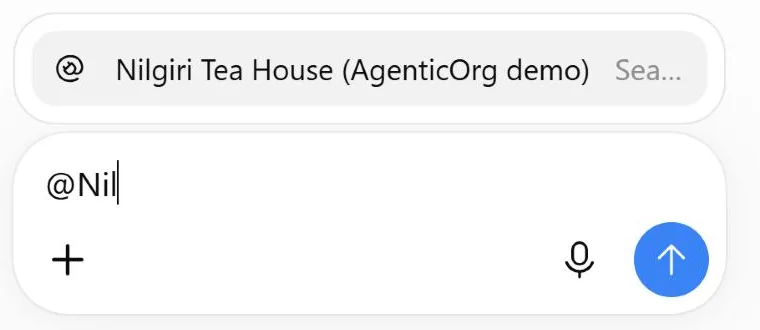
- Pick the plugin. Type
@Nilin the message box and choose Nilgiri Tea House.
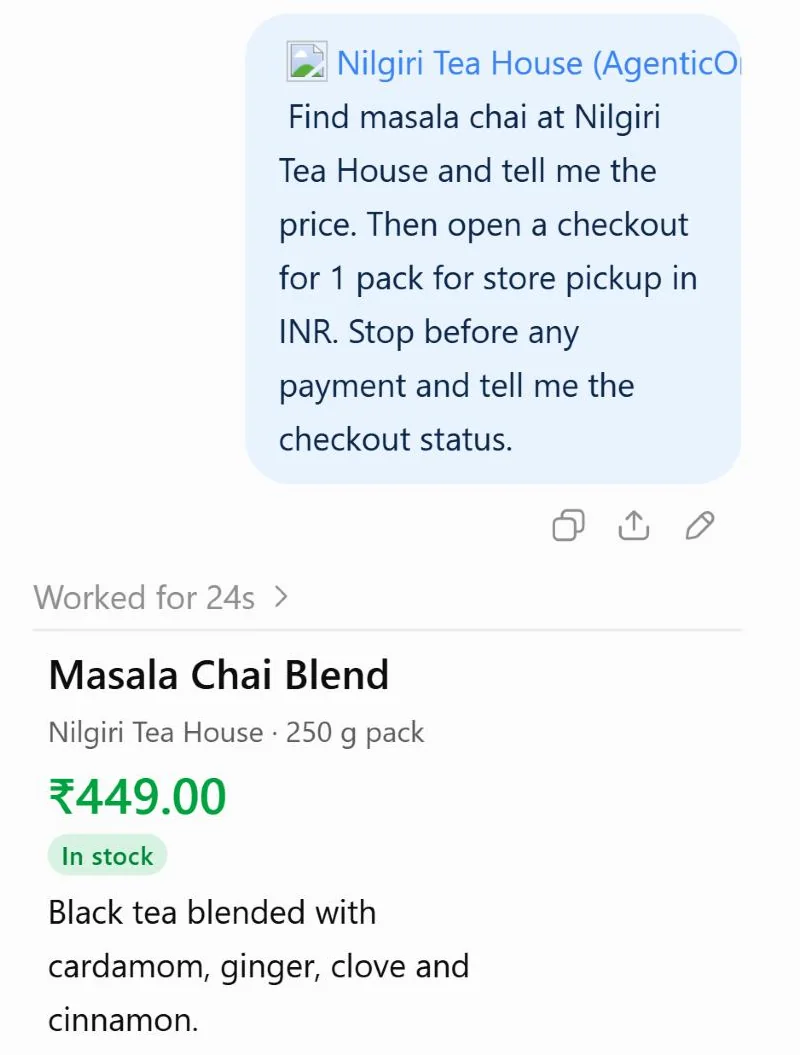
- Ask in plain words. Ask it to find masala chai, open a checkout for one pack for store pickup, and stop before paying. In 24 seconds ChatGPT searched the catalog and found Masala Chai Blend (250 g, in stock, ₹449.00).
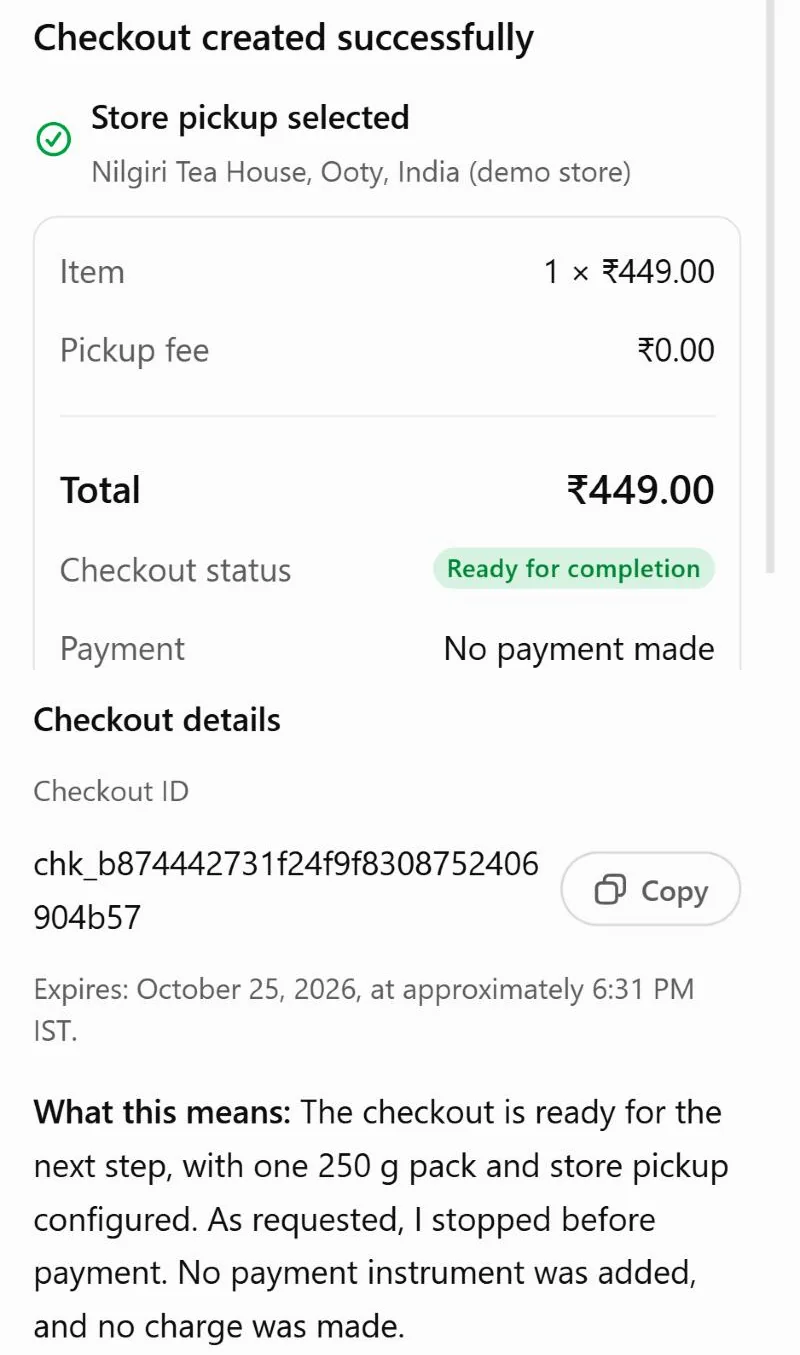
- Checkout, then stop at payment. ChatGPT opened the checkout and chose pickup at the Ooty store, which costs nothing. The checkout is ready for completion with a total of ₹449.00, and no payment was added or charged. A shop that has chosen where buyers pay would give the buyer a link to its own payment page here, only after the arbiter allows it.
ChatGPT may show a product photo it found on its own. The shop's catalog has no real photos, so any picture you see there does not come from Nilgiri Tea House.
Gemini, through the AgenticOrg MCP server
Gemini CLI was connected to the agenticorg-mcp-server UCP tools, pointed at the shop's profile.
Gemini asked before every tool call, and each call was approved by hand.
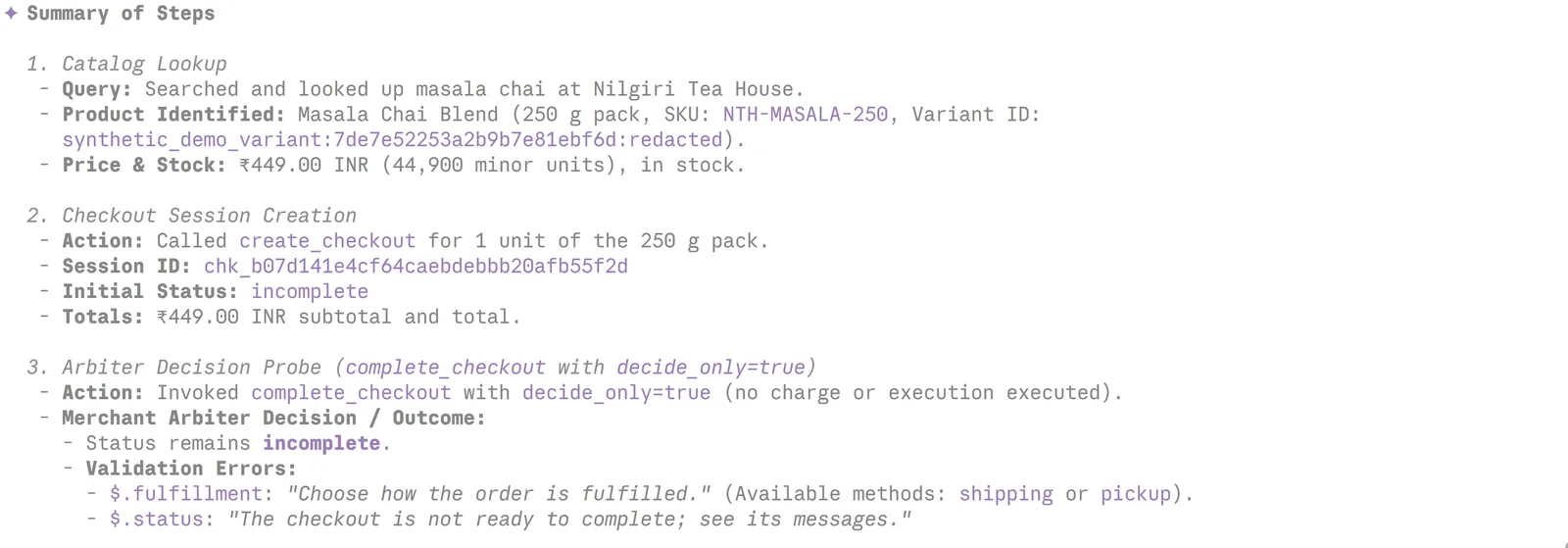
- Search and checkout. Gemini found Masala Chai Blend (NTH-MASALA-250) at ₹449, in stock,
and opened a checkout for one pack. The shop priced it at ₹449 and marked it
incomplete: it still needed to know how the tea reaches the buyer.
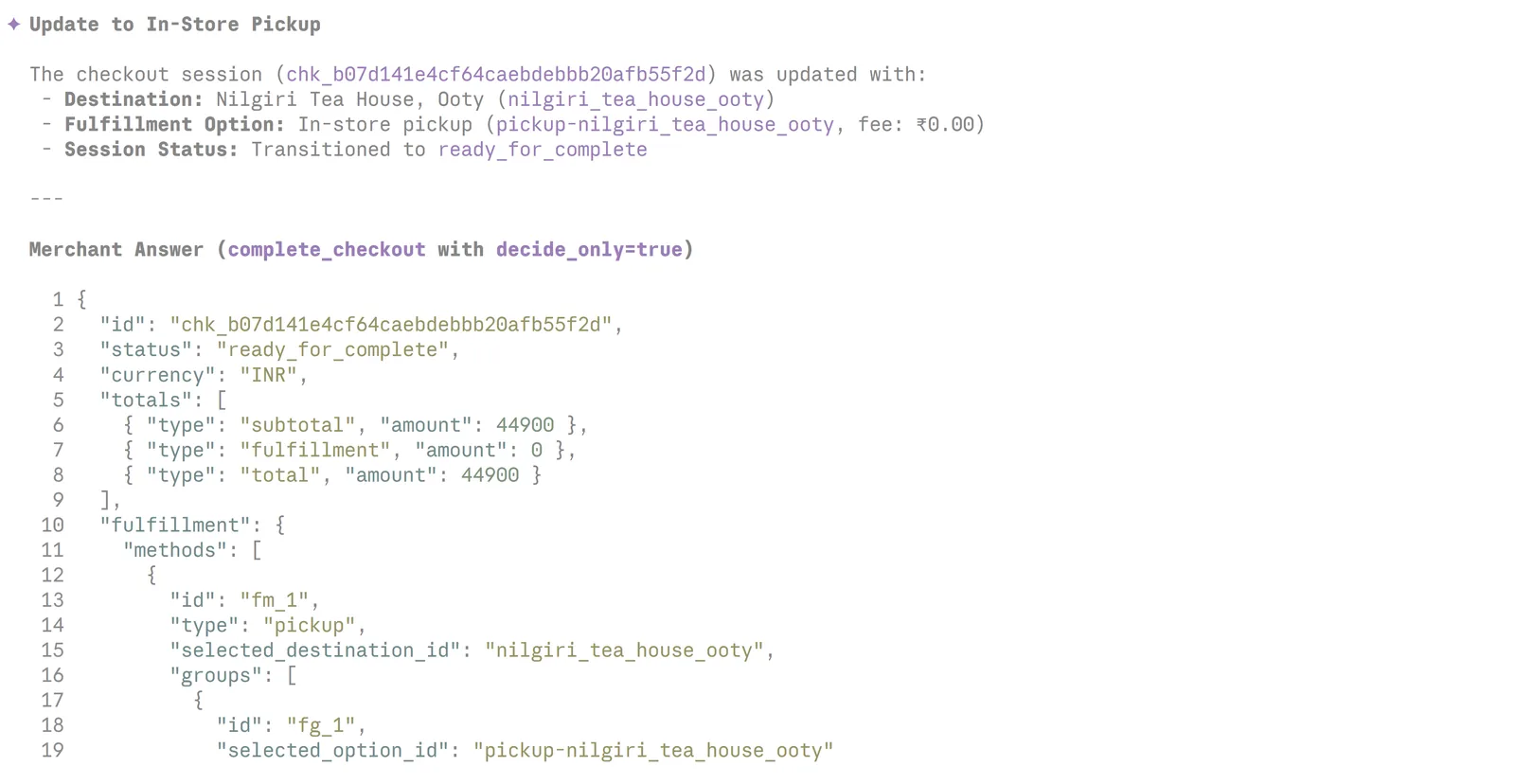
- Pickup chosen. Gemini chose in-store pickup at the Ooty store, which costs nothing. The
checkout moved to
ready_for_completewith a total of ₹449.
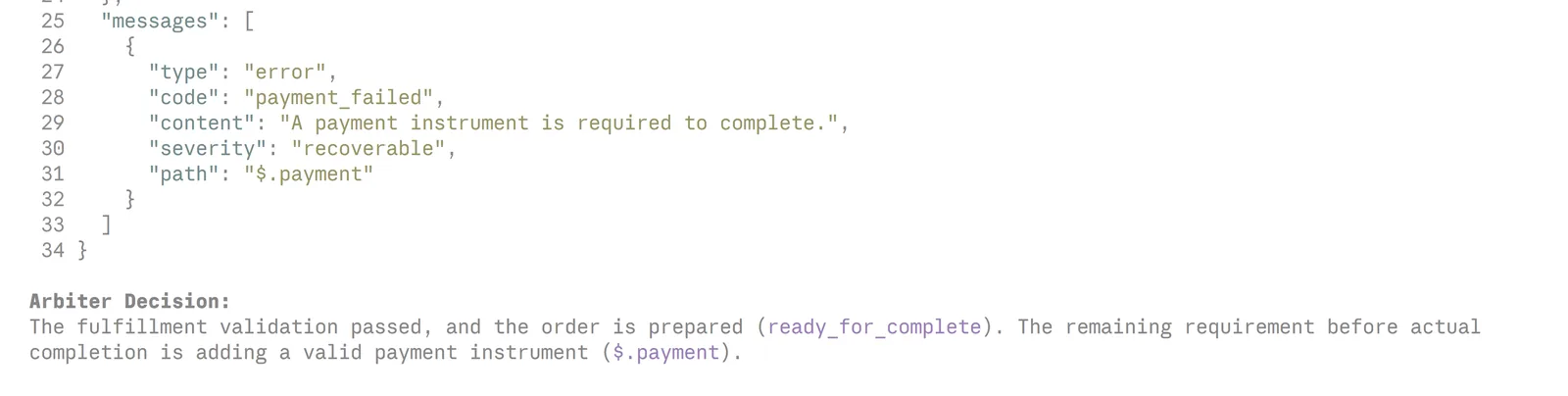
- Stop at payment. Asked to complete, the shop answered
payment_failed: "A payment instrument is required to complete." That is the payment layer. A shop that has chosen where buyers pay would answer with a link to its own payment page here, only after the arbiter allows it.
Telegram, through an AgenticOrg agent
An AgenticOrg agent with the ucp_buyer connector answers in a Telegram bot. It may search, read
and open checkouts at sandbox shops, and it has no tool that pays. Asked "Find masala chai at
Nilgiri Tea House and open a checkout for one", it replied:
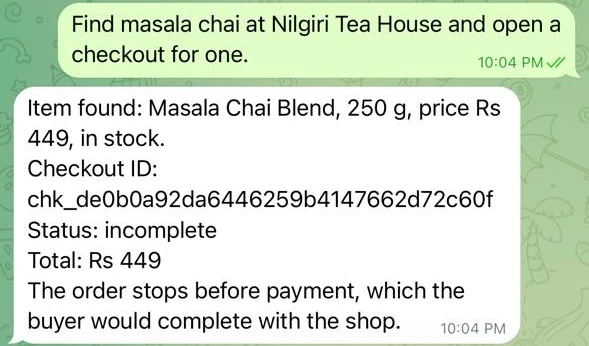
Behind that one message the agent searched the catalog, opened the checkout at the shop (HTTP 201) and answered, in about 30 seconds. To give your own agent these tools, see the UCP buyer connector.
Do the same for your shop
| Nilgiri Tea House did | You do | Where |
|---|---|---|
| Created its merchant and seller agent | Sign up and create your shop | Sell Everywhere |
| Loaded 10 synthetic products | Connect Shopify read-only, or upload a CSV or JSON file | Sell Everywhere |
| Had no shipping fee | Write your policies, and set a shipping fee if you have no Shopify | Sell Everywhere |
| Set limits in INR | Set your order limits, daily maximum and currency | Sell Everywhere |
| Had no payment method | Choose your Shopify checkout or your Plural account | Sell Everywhere, Payments |
| Got 11 artifacts signed and verified | Turn on Sell everywhere; it enrols you with Grantex and asks for the signatures | Sell Everywhere |
| Proved nilgiritea.agenticorg.ai | Take the address Sell everywhere gives you, or add your own subdomain and its records | Sell Everywhere, or Custom Domains |
| Published its profile | Nothing: Sell everywhere creates the key and publishes, and Publish shows why if it waits | Sell Everywhere |
| Opened checkout and the ACP feed | Issue each agent platform its own API key | Settings, API keys |
Most steps take a few minutes. Waiting for DNS and the certificate usually takes the longest.
What this demo does not do
- No real products or customers. Every product, price, store and address is synthetic, and each product description starts with "Synthetic demo product".
- No money moves. The demo has no payment method, so no checkout gets a payment link, and agent-executed payment is off.
- No shipping rates. The demo sets no shipping fee, so buyers choose store pickup. A real shop gets its rates from Shopify, or sets a flat fee on Sell Everywhere. The demo is for discovery, search and checkout decisions.
- No store-location search yet. Store locations are part of UCP 2026-08-25. The shop serves UCP 2026-04-08, so a location search answers that the feature is not served.